


Finatical Software Launches Reporting Pack and Integrates Claude in Excel
The combination of QuickBooks Online, Finatical's real-time Excel reporting, and AI-powered analysis from Claude creates a complete advisory workflow for fractional CFO and CAS firms
DURHAM, N.C., March 16, 2026 /PRNewswire/ -- Finatical Software, a provider of real-time Excel-based financial reporting for QuickBooks Online (QBO), today announced a major new release of Flash Reports featuring a powerful new Reporting Pack — and a first-of-its-kind integration with Claude in Excel that brings AI-powered financial analysis directly into the same workbook where live QBO data lives.

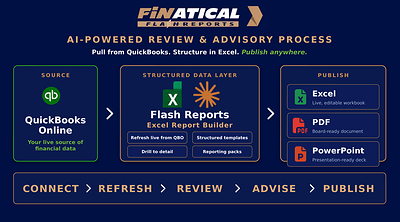
Together, QBO, Finatical, and Claude in Excel create a seamless end-to-end system: live financial data refreshed automatically from QBO, organized into branded, client-ready reports through Finatical's Flash Reports, and now instantly explainable and analyzable by Claude — all without ever leaving Excel.
This combination is a significant accelerator for fractional CFO firms and accounting firms building or expanding Client Advisory Services (CAS) practices, enabling them to deliver deeper financial insight to more clients with dramatically less manual effort.
A Complete Advisory System in Excel
Flash Reports has always given finance practitioners live QBO data in refreshable, customizable Excel reports. The new Reporting Pack takes this further by allowing users to build a full multi-section reporting workbook — complete with a branded cover sheet, index, narrative commentary pages, and any number of financial reports — that can be refreshed in seconds for any client or any reporting period.
Now, with Claude in Excel embedded directly in that same workbook, practitioners can ask Claude to explain variances, summarize trends, identify anomalies, and generate plain-language commentary for any report — with cell-level citations so every insight is traceable back to the source data.
"With this release, Flash Reports becomes more than a set of reports — it becomes a fully integrated advisory system," said Chris Meyer, CEO at Finatical Software. "Practitioners can now refresh live QBO data, generate branded client deliverables, and use Claude to help explain what the numbers mean — all in one place. For fractional CFOs and CAS firms, this changes what's possible."
Introducing the Flash Reports Reporting Pack
The Reporting Pack allows users to create a reusable reporting template that can include:
- A branded cover sheet with firm or client logo
- An index page
- Commentary and narrative pages
- Any number of financial reports or dimension-based lists
Once created, a Reporting Pack can be refreshed automatically using updated criteria such as new reporting dates. Each report in the workbook is re-executed with the latest QBO data — and automatically incorporates any new accounts or dimension values added in QBO since the last refresh, eliminating manual rework and reducing the risk of missing data.
Claude in Excel: AI Analysis Where the Data Lives
Claude in Excel allows finance professionals to work directly with Claude in a sidebar inside Microsoft Excel. Within a Finatical Flash Reports workbook, practitioners can use Claude to:
- Ask questions about any report, formula, or trend — with cell-level citations for full transparency
- Generate narrative commentary explaining variances, unusual patterns, or key highlights
- Test scenarios and summarize results in plain language for client presentations
- Navigate complex multi-tab reporting workbooks instantly
This transforms the advisory workflow: instead of spending time writing commentary from scratch, practitioners can focus on reviewing, refining, and delivering insights — while Claude handles the heavy lifting of turning numbers into clear explanations.
Built for the Firms Doing the Most Complex Multi-Client Work
Fractional CFO firms and accounting firms building CAS practices share a common challenge: they need to deliver high-quality, insight-driven QBO financial reporting to many clients simultaneously — consistently, efficiently, and with enough time left for actual advisory work. The Finatical + Claude in Excel combination is purpose-built to solve this:
- Standardize reporting across all client engagements with reusable Reporting Packs
- Refresh live QBO data in seconds for any client or period
- Use Claude to generate first-draft commentary and variance explanations
- Deliver branded, professional deliverables with firm or client logos
- Spend time on strategic advisory — not manual report preparation
Availability
The enhanced Flash Reports release with Reporting Pack is available now. Claude in Excel is available in beta for Claude Pro, Max, Team, and Enterprise plan customers and can be installed from Microsoft AppSource by searching for "Claude by Anthropic for Excel."
For more information, visit www.finaticalsoftware.com.
About Finatical Software
Finatical Software provides real-time, Excel-based financial reporting for QuickBooks Online users. Designed for finance professionals who live in Excel, Finatical's Excel add-in enables dynamic reporting, forecasting, and analysis with live data refresh — without manual exports or workarounds.
About Claude in Excel
Claude in Excel is an AI-powered add-in from Anthropic that lets professionals work directly with Claude in a sidebar inside Microsoft Excel. Claude can read, analyze, and explain complex multi-tab workbooks, navigate formulas with cell-level citations, and help users understand and communicate what their data means.
Media Contact:
Melissa Neal
Finatical Software
[email protected]
SOURCE Finatical Software





Share this article